Inbox Starters 📬✨
What are Inbox Starters?
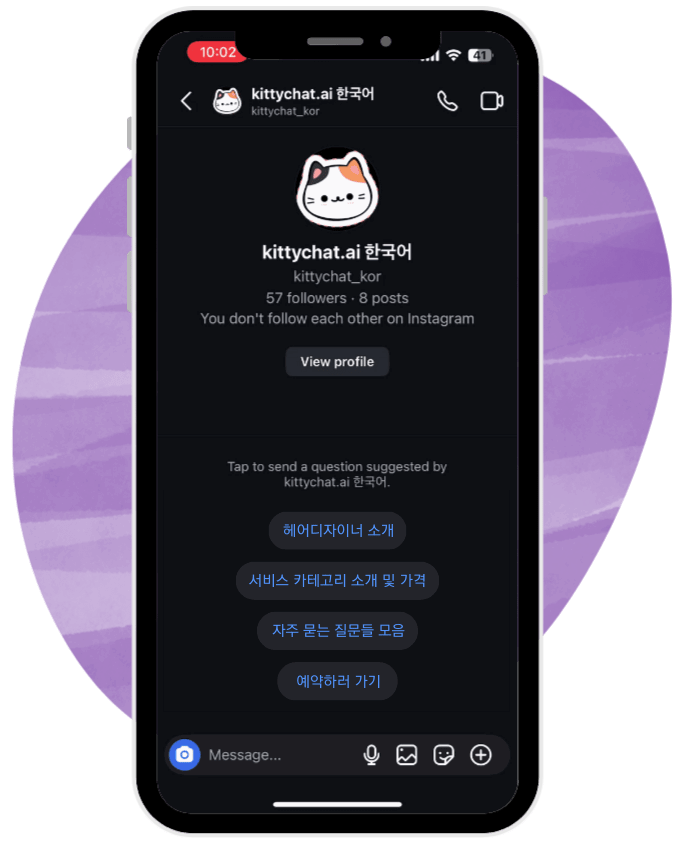
Inbox Starters are a menu / FAQ-style screen that appears immediately when someone opens your Instagram DM.
They help visitors quickly understand what they can do in your DM and guide them to the right information—without typing anything. 🚀
What You Can Show 🧭
You can display up to 4 items on the Inbox Starters screen
Each item can be:
❓ A FAQ-style question, or
🔘 A menu-style button (e.g. “Menu”, “Pricing”, “Book Now”)
This makes your DM inbox feel structured and easy to navigate.
What Happens When a Button Is Clicked? 👆
When a visitor clicks an Inbox Starter button, they receive an automated response, which can be either:
📝 Text message, or
🃏 Button Template Card
Button Template Cards Explained 🃏
When using a Button Template Card:
Each card can include up to 3 buttons
You can add up to 10 cards and display them as a carousel
Perfect for:
🍽️ Restaurant menus
🛎️ Service categories
🛍️ Product collections
Follower-Only Content Control 🔒
With Button Template Cards, you can control visibility:
✅ Followers can see the content after clicking the button
🚫 Non-followers will be asked to follow your account first before viewing the message
This is useful for:
Gated offers
Coupons
Exclusive content
Menu Behavior After Interaction ℹ️
Once a visitor clicks a button, the Inbox Starters menu disappears
This keeps the conversation clean and focused on the selected topic
Bring the Menu Back with Persistent Menu ☰
Visitors can always access menu options again by:
Tapping the ☰ (three-line menu icon)
Located at the top-right corner of the DM screen
This opens the Persistent Menu, allowing users to navigate anytime during the conversation.