Button-Style Carousel Messages 🎠🃏
What is a Button-Style Carousel?
You can display up to 10 Button-Style Template messages in a carousel format to showcase your services, products, or categories in a visually organized way.
This format is ideal for:
🛍️ Product collections
🛎️ Service menus
🍽️ Restaurant menus
📚 Multi-option guides or catalogs
How to Add Multiple Cards ➕
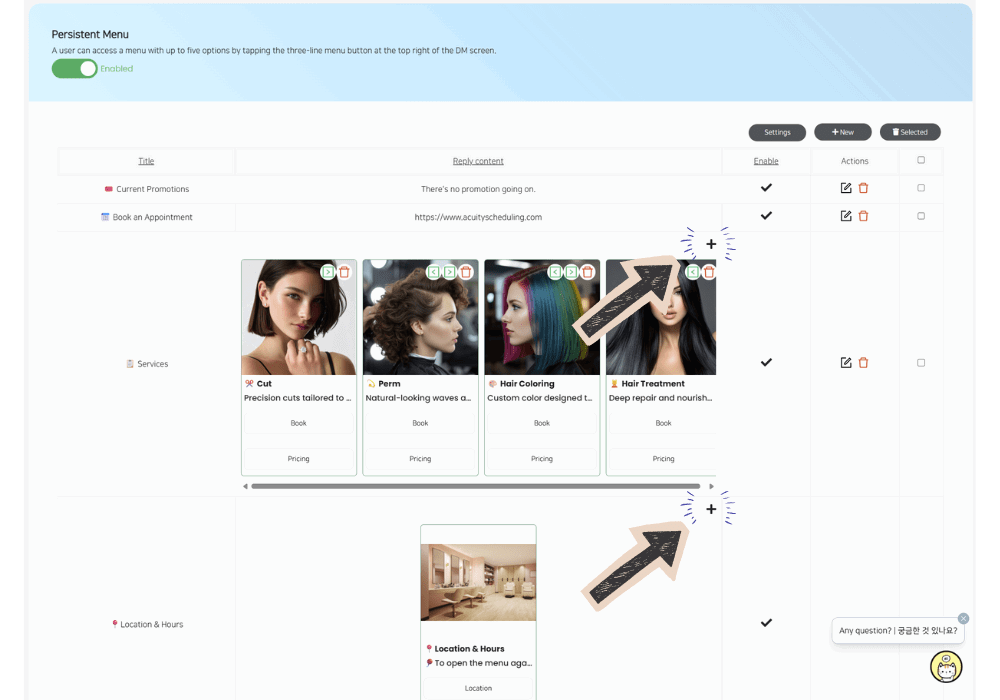
Add your first Button-Style Template message and save it
Once saved, you’ll see a ➕ (plus icon) at the top-right corner of the button-style message section
Click the plus icon to add another card
Repeat this process to add up to 10 cards in the carousel
Each card can include:
An image
Title & subtitle
Up to 3 buttons
Important: Desktop Only ⚠️💻
❌ Adding or editing carousel cards is not supported on mobile devices
✅ You must use a desktop or laptop computer to:
Add new cards
Edit existing carousel messages
Once created, the carousel will display correctly for users on both mobile and desktop.