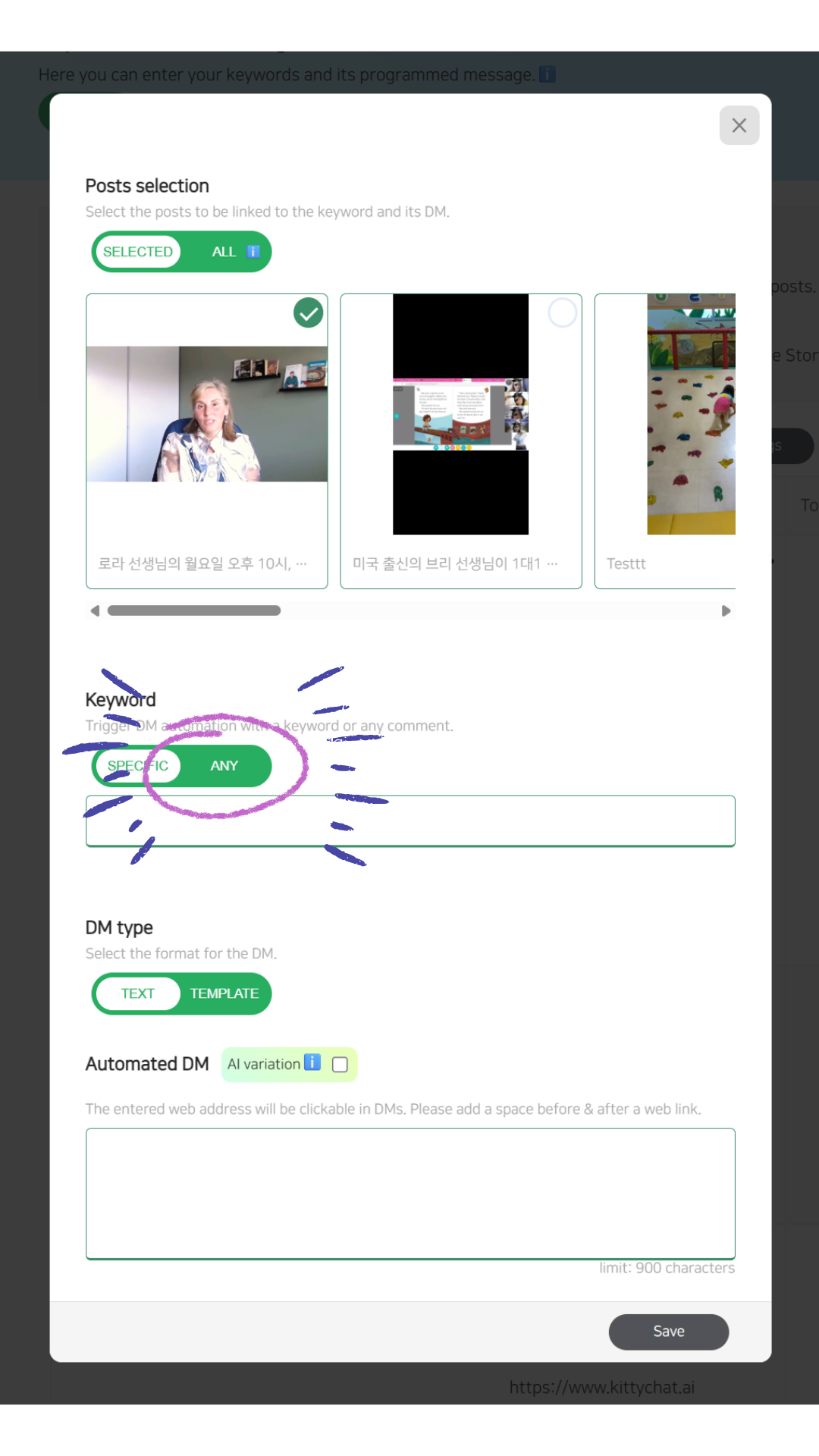
Any-Comment Auto DM 💬
What is Any-Comment Auto DM?
Any-Comment Auto DM allows you to trigger an Auto DM from any comment input, regardless of the keyword used.
When this option is enabled, any text, emoji, or combination of characters left in the comment will activate the Auto DM automatically. ⚡
How It Works
If a user leaves any comment on the selected post(s)
The Auto DM is triggered without requiring a specific keyword
Emojis, short text, or mixed content all count as valid triggers
This creates a smoother and more natural engagement flow for followers. 🤝
Setup Requirements ⚠️
To use Any-Comment Auto DM, please note the following:
✅ You must select at least one specific post for this setup
❌ You cannot select “All Posts” when using Any-Comment Auto DM
The trigger only works on the posts explicitly linked to this Auto DM setup
This limitation ensures precise control and avoids unintended triggers across all content.
Keep in mind - Keyword Auto DM Still Allows Variations ✨
Even when using keyword-based Auto DM, keep in mind:
Comments that include extra text or emojis in addition to the keyword
Can still successfully trigger the Auto DM
For example:
info 😊I want the deal!coupon please 🔥
These variations are considered valid and will still activate the automation.
Why Influencers Use This Option 👑
This feature is especially popular among influencers and high-engagement accounts who want to:
Avoid large volumes of identical keyword comments
Reduce the risk of being flagged by Instagram’s spam detection system 🚨
Encourage more natural and diverse comment behavior
By allowing any comment to trigger the Auto DM, engagement looks more organic and safer at scale.
How to Enable It 🛠️
Open the Auto DM setup pop-up
Go to the Keyword section
Select “Any” as the trigger option
Choose at least one post and save
That’s it — your Auto DM will now trigger on any comment input 🎉